
 MagicPicker
 MagicSquire
 MagicRefs
 MixColors
 DiskFonts
 Extension Manager
Tip#129: New HUD controls in MagicPicker 10
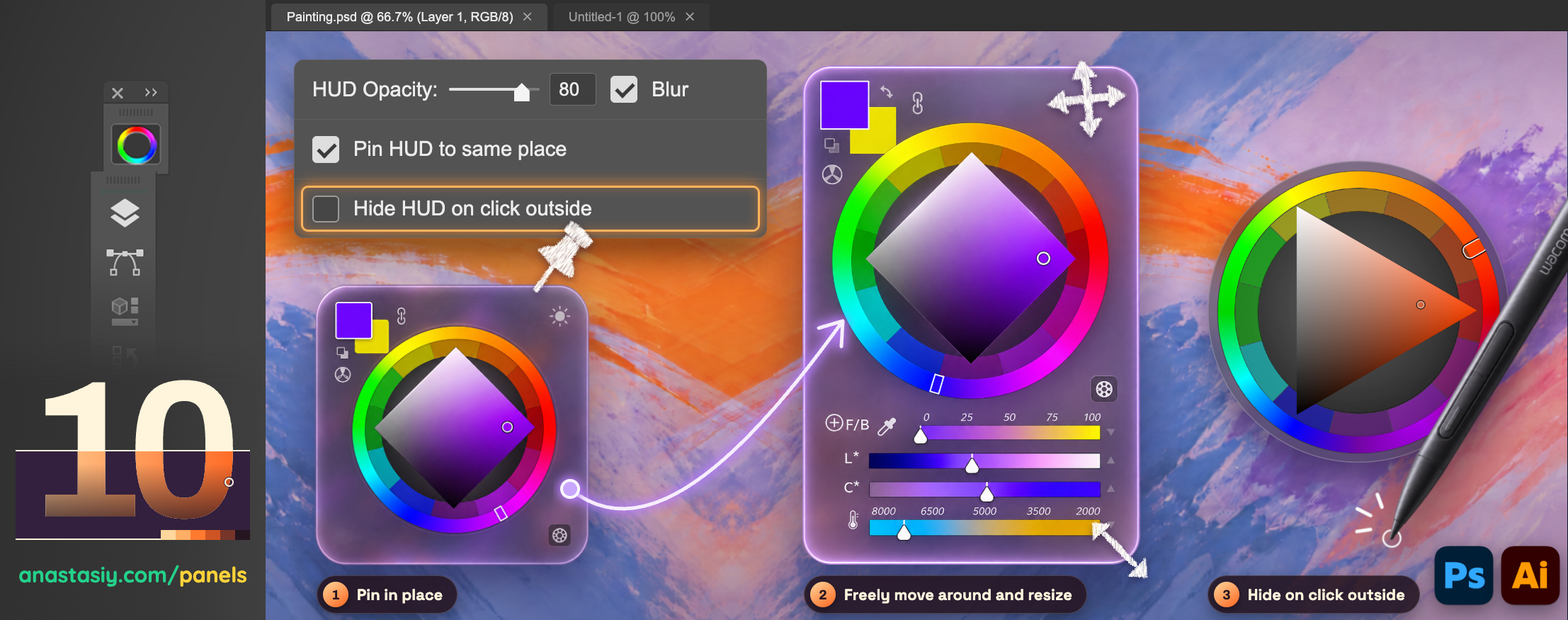
MagicPicker 10 gives you new levels of control over the color wheel HUD. Pin it in place, move and resize it anywhere, or keep it on screen while you paint. It works like a regular Photoshop panel, and does much more.
1. Pin in place
Turn on Pin HUD to same place and the HUD always opens exactly where you left it. No more looking for it or repositioning it every time, so your eyes and your stylus always know where to go. You can set up a keyboard shortcut in Settings to open it at any time.
2. New in MagicPicker 10! Freely move around and resize
Uncheck the new Hide HUD on click outside option, then drag the HUD anywhere on the screen and resize it to the size that suits your work: compact over a small canvas, or large for precise picking on a big display, with sliders and all MagicPicker features. With pinning on, MagicPicker remembers the new place.
The new Hide HUD on click outside option decides what happens when you click anywhere else:
- On: the HUD closes as soon as you click outside of it, the classic quick-pick popup.
- Off: the HUD stays open while you paint, pick and switch tools. It works the same way as a normal Photoshop panel, always within reach.
Turning it off also fixes the Wacom pen clicking problems with Photoshop.
3. Click the document to hide it
Turn on the new Hide HUD on click outside option so the HUD hides when you start painting.
HUD opacity and blur
Set HUD Opacity to choose how much of your artwork shows through, and turn on Blur for a soft, frosted glass background that keeps the color wheel easy to read over any image.
How to set it up
- Click MagicPicker 10’s Settings menu.
- Check Pin HUD to same place if you want the HUD to always open at the same spot.
- Uncheck Hide HUD on click outside to keep the HUD on screen while you paint.
- Adjust HUD Opacity and Blur to taste, then click OK.
All HUD features work natively on Apple Silicon, in Adobe Photoshop and Adobe Illustrator from 2014 up to 2026.
From series of tutorials for MagicPicker, advanced Photoshop color wheel